
Home -> Law Blog Directory -> Law Technology Blogs -> Legal Andrew
(866) 635-2689 for Personal Injury or (866) 635-9402 for Criminal Defense
Find a Local Lawyer
Divorce (866) 635-6190
Personal Injury (866) 635-2689
Criminal Defense (866) 635-9402

Law Technology
: Legal Andrew3 Launchy Tricks ? Evernote, Google Voice, RTM
By Andrew Flusche
If you want to control your computer from your keyboard, check out Launchy. It’s a free keystroke launcher. Here are three ways to supercharge Launchy.
Evernote
I use Evernote for all my note-taking needs. I constantly need to pull up a note that I’ve previously written. With Launchy and Evernote’s Windows scripting, this is now a piece of cake.
To pull up all of your notes that contain a particular string, you execute a command like this:
C:\Program Files\Evernote\Evernote3\ENscript.exe /showNotes QUERY
We can plug that into Launchy as a Runner command:
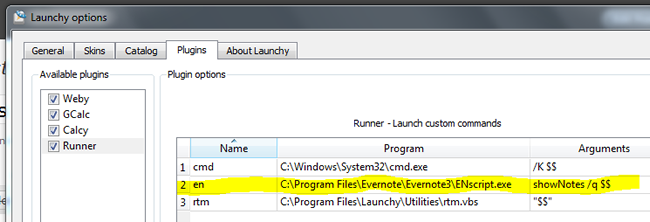
Now you can go straight to an Evernote search by typing something like this into Launchy:
en {Tab} QUERY
Fast as lightning!
Google Voice
This one’s a bit more complicated, but it’s cool. When you’re done, you’ll be able to initiate a Google Voice call by using a command like this in Launchy:
gv {Tab} 555.111.2323
That command will tell Google Voice to call your designated phone and then connect you to the phone number you entered. Ready to see how it’s done?
1. Create a Google Voice call script.
I did this in PHP. You can download this awesome class which lets you easily initiate a Google Voice call via PHP.
Put a script on your webserver that uses the Google Voice Dialer class and looks like this (replace the capitalized words with the proper values):
$gv = new GoogleVoice(USERNAME, PASSWORD);

$gv->call(YOUR-PHONE-NUMBER, $_POST['theirNumber']);
2. Now you can create a batch file on your hard drive that calls the PHP script from your web server:
@echo off

cd c:\

cmd /c curl --basic --data "theirNumber=%*" http://www.your-domain.com/your-google-voice-caller.php

Echo Exiting...
3. Prepare Launchy.
You can do this by going to the Launchy preferences, editing the “Catalog,” and adding the directory where the batch file resides. Be sure you also tell Launchy (in the Catalog tab) to look for *.bat files.
4. Call away!
Now you can call people through Google Voice with just a couple key strokes.
Remember the Milk
And to round out our trio, here’s a quick way to add tasks to RTM.
It’s actually from Lifehacker. Just download their handy script, follow the instructions, and you’ll be adding tasks in a flash!
Do you use Launchy? Any cool tips to share?
Full post as published by Legal Andrew on September 21, 2009 (boomark / email).
ASMP and Other Visual Artists File Class Action Lawsuit Against Google
Google Faces Class Action for Copyright Infringement
Automated Calls
Voice Mail Broadcasting Corp. pays $180,000 FTC settlement for telemarketing violations.
Google Sued for Violating the Privacy Rights of Millions of Americans
Google Sued for Violating the Privacy Rights of Millions of Americans
Google Settles Buzz Class Action for $8.5 Million
Google Settles Buzz Class Action for $8.5 Million
Google Inc.
alleging deceptive charges for ads displayed on third party web sites.
Google
Settles Book-Scanning Class Actions for $125 Million

#1 Online Legal Resource

On 08-25 at 15:46PM
Acute perpendicular parking #NYPD #NYFD
On 08-18 at 22:18PM
Parallel parking gone bad. Too much gas UES NYC
On 08-18 at 21:41PM
UES NYC
On 08-18 at 21:25PM
Twitter suspends journalist critical of broadcast partner's coverage on dubious grounds @guyadams #nbcfail #twitterfail
On 07-30 at 17:57PM
Model example of 1st Amendment suppression by the People of New York City's Michael Bloomberg #OWS #NYPD
On 07-12 at 21:07PM
AG Holder lackadaisical on Operation in our Sites domain name seizures & RIAA lobbied free speech suppression @dajaz1
On 06-08 at 22:44PM
Why is the Catholic Church going to court over Obama contraception policy? @NewYorker commentary
On 05-31 at 10:08AM
Monks sue Louisiana for right to sell caskets made from forrest destroyed by Katrina
On 05-31 at 07:47AM
Are the abortion ultrasound laws headed for the Supreme Court?
On 05-15 at 21:52PM





"Evernote Ends Closed Beta, Open to All "
"10 Simple Google Search Tricks"
EverNote Beta: Never Forget Anything
Top 10 Obscure Google Search Tricks





 |
|
Contact Us | About Us | Celebrity Law Blog |
Our Partners | Disclaimer
| Law Blog Directory
| Law Jobs
| Law Tweets
| Oil Spill Video
All original material © 1999-2011 by USLaw.com. All other material, including Blog Directory feed content, are © by their respective copyright holders. |