
Home -> Law Blog Directory -> Legal Commentary Blogs -> TalkLeft
(866) 635-2689 for Personal Injury or (866) 635-9402 for Criminal Defense
Find a Local Lawyer
Divorce (866) 635-6190
Personal Injury (866) 635-2689
Criminal Defense (866) 635-9402

Legal Commentary
: TalkLeftRandom Tech Issue
By Jeralyn
Just in case any tech gurus are reading today: I've been battling a new version of an e-discovery program the Government uses when providing us with wiretap discovery. It's called IPro Tech.
It's using a "new build" and the program won't open on my Windows XP desktop. I get an error that says "run-time error, invalid file format, 20009." [More..]
We aren't provided the full version of the program -- each disk has a self-executing version built in. The disks with the older version work fine. The new disks load on my laptop with Vista, and on the office desktop with XP, but not on my home desktop. The images in the IPro program are "tiffs." I thought it might be conflicting with the scanner, but I have the same scanner attached to both desktops and one works, and one doesn't.
I spent an hour and a half on the phone with the iPro tech people and they can't figure it out. I spent 6 hours yesterday and a $70.00 buying registry cleaners and file fixers in case it was a file association. No go.
I copied one new disk to a thumb drive and put it on my desktop. I opened "explore" on the desktop version and three files came up: Data, Images and "ipro.exe." I changed the "ipro exe" to "ipro1.exe" and pasted in the "ipro.exe" file from a disk with the old version. It worked and I was so excited. But, when I tried to print to pdf, it said a file was missing and I didn't want to fool with my Adobe files, so now I can read but I can't save individual documents. And, there are 20 disks, I don't want to have to do that for each one.
I need to be able to save individual documents on the disk on my hard drive and not have to sift through 20,000 pages every time I want to review them. When I open the image folder, they are there as "tiffs" and if I try to open them, they open in Windows Fax Viewer. When I look to see what file association my computer is using for 'tiffs' and see if I can change it, the only options are Windows Fax Viewer and some program called "Paint."
I know it's a new build because the ipro.exe files on the disk that won't open have a different ipro graphic than the files on the disk that will open, and a slightly different version number.
While the iPro site has some downloads, they are only for those that have the full version of the program loaded on their hard drives. And I don't have it, just the self-executing version that comes on every disk. The Government gave us a "vista fix" because some lawyers were having a problem getting the program to work with Vista, but I'm not having problems with Vista, just with one desktop running XP.
I've done a ton of google searches for "run time errors" and "invalid file format" and nothing helps.
So, any ideas as to what's causing the problem? If I could figure that out, I'm hoping I can get iPro to come up with a solution.
Update: Some pix:
The error message on the new version:

The new version that doesn't work (8.6.0.1):
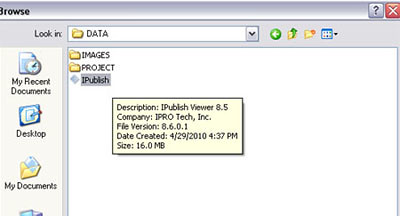
The old version that does work (8.60.00):

The disks that work all have this graphic, as opposed to the graphic in the first picture above:

Full post as published by TalkLeft on October 31, 2010 (boomark / email).
Mr. Brown Instant Coffee
Possible Melamine Contamination Prompts Canadian Agency to Issue Warning
State of Virginia
$11 million settlement reached in Virginia Tech massacre.
Cipro
The FDA is seeking to add black box warnings of the risk of tendon rupture associated with Cipro and Levaquin.
The ruptures can involve Achilles tendon, shoulder, hand, bicep or thumb tendons, and is especially increased in patients older than 60, or people who have received kidney, heart or lung transplants, as well as people on steroid therapy...

#1 Online Legal Resource

On 08-25 at 15:46PM
Acute perpendicular parking #NYPD #NYFD
On 08-18 at 22:18PM
Parallel parking gone bad. Too much gas UES NYC
On 08-18 at 21:41PM
UES NYC
On 08-18 at 21:25PM
Twitter suspends journalist critical of broadcast partner's coverage on dubious grounds @guyadams #nbcfail #twitterfail
On 07-30 at 17:57PM
Model example of 1st Amendment suppression by the People of New York City's Michael Bloomberg #OWS #NYPD
On 07-12 at 21:07PM
AG Holder lackadaisical on Operation in our Sites domain name seizures & RIAA lobbied free speech suppression @dajaz1
On 06-08 at 22:44PM
Why is the Catholic Church going to court over Obama contraception policy? @NewYorker commentary
On 05-31 at 10:08AM
Monks sue Louisiana for right to sell caskets made from forrest destroyed by Katrina
On 05-31 at 07:47AM
Are the abortion ultrasound laws headed for the Supreme Court?
On 05-15 at 21:52PM





Does it suit or not You tell me
Not-quite-random mid-day blogger/tech comment
Keeping Up with Tech for Lawyers: Some Resources
Random Plug for my Random Blog
Law: Random selection for H-1B petitions





 |
|
Contact Us | About Us | Celebrity Law Blog |
Our Partners | Disclaimer
| Law Blog Directory
| Law Jobs
| Law Tweets
| Oil Spill Video
All original material © 1999-2011 by USLaw.com. All other material, including Blog Directory feed content, are © by their respective copyright holders. |