
Home -> Law Blog Directory -> New Law Blogs Blogs -> Supreme Court of Texas Blog
(866) 635-2689 for Personal Injury or (866) 635-9402 for Criminal Defense
Find a Local Lawyer
Divorce (866) 635-6190
Personal Injury (866) 635-2689
Criminal Defense (866) 635-9402

New Law Blogs
: Supreme Court of Texas BlogDetailed Texas Supreme Court voting statistics for 2010 term now on DocketDB
By Don Cruse
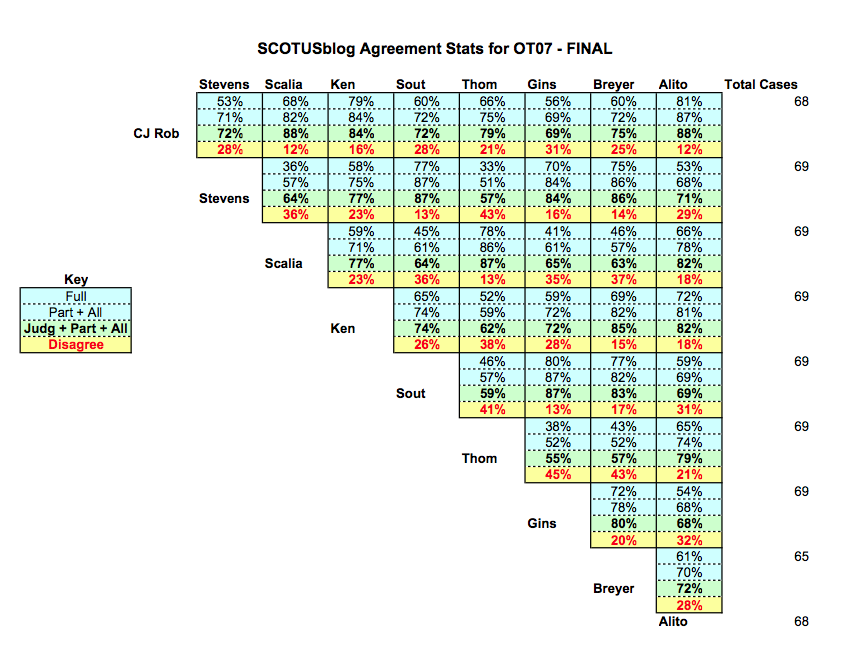
You may have seen the “stat pack” offered by SCOTUSblog with voting statistics for the Justices.
Its wedge-shaped voting chart is familiar — and, for a time, it became a staple of Texas CLE programs as well. Following that path, I prepared some of these charts for an Austin appellate bar program in March.
The experience made me more conscious of two weaknesses in these charts.
First, the author often must choose what universe of cases to show — all opinions, all signed opinions, only divided opinions. The easy choice is “all opinions,” but it gives very little signal compared to noise. In other words, the unanimous opinions push up the percentages and hide disagreements in the more challenging cases.
Second, even with a background in economics and math, I was bothered just seeing a percentage showing that two Justices agreed 60% of the time. That top-level statistic is fine for people who just want to make a broad-brushed assertion about the general makeup of the Court. But as an advocate I wanted to know which cases led to that disagreement. That is where a serious advocate can start to learn how two Justices might approach a problem differently.
Announcing DocketDB voting tables for 2010
I finally have a set of voting charts that make me happy. The basic layout should look familiar.
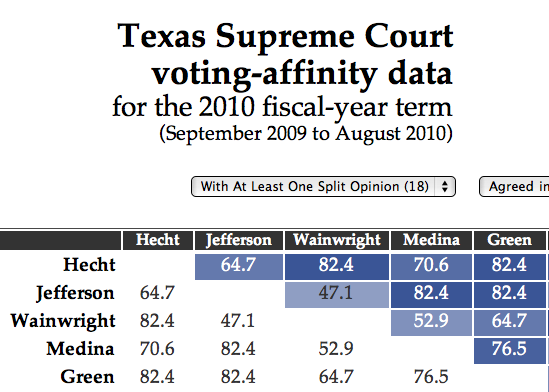
But this chart is dynamic — you can choose to focus on the scope of cases you want (all opinions? only signed opinions? only those with a dissent?):
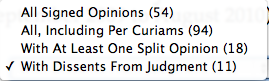
You can also choose the types of disagreement you want to highlight (disagreements in opinion? or only in judgment?):

And the real kicker for me: You can click on a cell in the table and drill down to a page that shows — for each pair of Justices — the specific cases on which they agreed in the opinions, agreed in the judgment, or did not agree in the judgment.
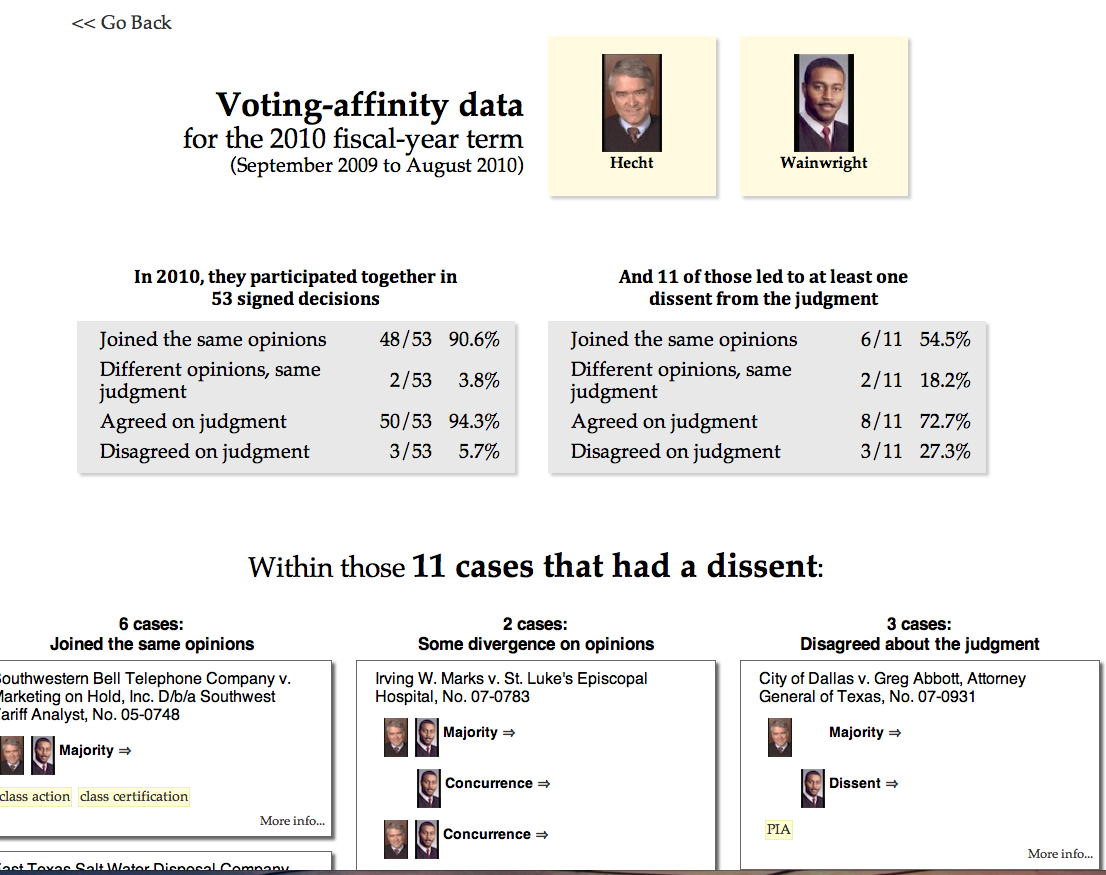
These detail pages benefit from the keywords when they are present in DocketDB. You can also jump from here directly to each relevant opinion.
Where to find the voting charts
The dynamic 2010 Texas Supreme Court voting analysis charts are available to anyone who has registered for DocketDB.
Once you’ve logged in, look under your “Research Tools” menu in the top left of the menu bar. You should see the new “Vote Analysis” option.
I’ve always reserved some of the DocketDB features for the professional subscribers who help support the site financially. With this set of voting tables, I have reserved the data for 2006 to 2009 for those supporters.
For the future…
I haven’t yet decided on a next step, but I’ll mention two further enhancements that could be built on this same set of data:
Choosing cases by subject matter, rather than a whole term. Back in March, I was asked if it was possible to look just at the cases involving a particular issue. The answer now is that, yes, it is possible. A chart can be made for any set of cases, defined on any characteristic in the database. (The trick is defining those sets of cases, or creating a tool that lets users create their own sets of cases.)
Graphic representation of voting patterns. I’m thinking of the slides that I presented in March 2010, showing the relative voting position of the Justices in 5-4 cases. (Here’s the slide (PDF) I made for the U.S. Supreme Court, to give you an idea.) The data that powers today’s dynamic voting tables should be able to power those same graphics. (I used a different computer to build those charts, and the trick here would be folding this into the main DocketDB code in a way that works for the web.)
Those two enhancements could be combined to show, for example, a graphic representation in how the Justices vote on cases about statutory construction, or civil procedure, or medical-malpractice cases.
As always, I very much welcome your input about what new features would be helpful to your practice.
Full post as published by Supreme Court of Texas Blog on October 05, 2010 (boomark / email).
Selection of State Supreme Court Judges
How State Court Judges are Selected
California Supreme Court Proposition 8 Decision
Court Rejects Challenges to Proposition 8, but Finds Marriages Valid
Dumb Texas Laws
Stupid Laws in the Lone Star State
Is Barack Obama a Natural Born Citizen?
Wrotnowski v. Bysiewicz (Supreme Court): Does Obama meet the constitutional requirements to be President
Unwed Fathers' Rights in Adoption
Landmark Cases in Adoption Law Shape Law with respect to Unwed Fathers
Cumulative Voting
Protecting minority shareholder interests
Texas Employment Law
alleged violations of Texas labor laws including overtime pay, discrimination and harassment.
Pesticides
Long-Term Exposure Linked to Diabetes
Long-Term Insurance Suit
Settled for $15 Million
UnumProvident
for allegedly denying long-term disability claims.
Texas' KB Home Hit with Price Fixing Class Action
Texas' KB Home Faces Price Fixing Class-Action
BP to Pay $15M for Texas Refiney Violations of Clean Air Act
BP to Pay $15M for Texas Refiney Violations of Clean Air Act

#1 Online Legal Resource

On 08-25 at 15:46PM
Acute perpendicular parking #NYPD #NYFD
On 08-18 at 22:18PM
Parallel parking gone bad. Too much gas UES NYC
On 08-18 at 21:41PM
UES NYC
On 08-18 at 21:25PM
Twitter suspends journalist critical of broadcast partner's coverage on dubious grounds @guyadams #nbcfail #twitterfail
On 07-30 at 17:57PM
Model example of 1st Amendment suppression by the People of New York City's Michael Bloomberg #OWS #NYPD
On 07-12 at 21:07PM
AG Holder lackadaisical on Operation in our Sites domain name seizures & RIAA lobbied free speech suppression @dajaz1
On 06-08 at 22:44PM
Why is the Catholic Church going to court over Obama contraception policy? @NewYorker commentary
On 05-31 at 10:08AM
Monks sue Louisiana for right to sell caskets made from forrest destroyed by Katrina
On 05-31 at 07:47AM
Are the abortion ultrasound laws headed for the Supreme Court?
On 05-15 at 21:52PM





U.S. Supreme Court Still to Rule on Seven Big Cases This Term.
Texas: the NAMUDNO challenge to the Voting Rights Act docketed in Supreme Court
Official (and Unofficial) Supreme Court Statistics, 1999-2009
Supreme Court Agrees to Review Voting Rights Case
SCOTUSblog's Statistical Analysis of the Supreme Court Term
Statistics From Around the Blawgosphere





 |
|
Contact Us | About Us | Celebrity Law Blog |
Our Partners | Disclaimer
| Law Blog Directory
| Law Jobs
| Law Tweets
| Oil Spill Video
All original material © 1999-2011 by USLaw.com. All other material, including Blog Directory feed content, are © by their respective copyright holders. |