Home -> Law Blog Directory -> Legal Marketing & PR Blogs -> Larry Bodine's LawMarketing Blog
(866) 635-2689 for Personal Injury or (866) 635-9402 for Criminal Defense
Find a Local Lawyer
Divorce (866) 635-6190
Personal Injury (866) 635-2689
Criminal Defense (866) 635-9402

Legal Marketing & PR
: Larry Bodine's LawMarketing BlogHow to Add Captions To Your YouTube Videos
By Larry Bodine
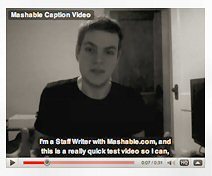 YouTube has a global audience, so if you want to reach as many people as possible, you'll have to make sure subtitles are available for your videos. You'll want closed captioning to reach the deaf and hard of hearing, too. Thankfully, that process has shifted from relatively easy to an absolute breeze in recent months. Here's how to make it happen.
Once you've uploaded a video to your YouTube account, you have two options for generating subtitles for the video:
- You can use the CaptionTube web app that Google has created
- You can upload a transcript you make yourself and use Google's speech recognition technology to automatically assign the right times to each caption.
In either case, you'll end up with a text file that you can edit to make corrections if need be, and viewers will be able to either read the captions in their native language or translate them on the fly when watching your video.
For illustrated instructions visit Mashable.com at http://bit.ly/6Ns5CN
Full post as published by Larry Bodine's LawMarketing Blog on January 18, 2010 (boomark / email).
How to Skirt H-1B Regulations
Senator reacts to YouTube video

#1 Online Legal Resource

On 08-25 at 15:46PM
Acute perpendicular parking #NYPD #NYFD
On 08-18 at 22:18PM
Parallel parking gone bad. Too much gas UES NYC
On 08-18 at 21:41PM
UES NYC
On 08-18 at 21:25PM
Twitter suspends journalist critical of broadcast partner's coverage on dubious grounds @guyadams #nbcfail #twitterfail
On 07-30 at 17:57PM
Model example of 1st Amendment suppression by the People of New York City's Michael Bloomberg #OWS #NYPD
On 07-12 at 21:07PM
AG Holder lackadaisical on Operation in our Sites domain name seizures & RIAA lobbied free speech suppression @dajaz1
On 06-08 at 22:44PM
Why is the Catholic Church going to court over Obama contraception policy? @NewYorker commentary
On 05-31 at 10:08AM
Monks sue Louisiana for right to sell caskets made from forrest destroyed by Katrina
On 05-31 at 07:47AM
Are the abortion ultrasound laws headed for the Supreme Court?
On 05-15 at 21:52PM





YouTube Censors Investigative Videos Critical of Planned Parenthood
Is YouTube Homophobic and Sexist
Pornographic videos flood YouTube





 |
|
Contact Us | About Us | Celebrity Law Blog |
Our Partners | Disclaimer
| Law Blog Directory
| Law Jobs
| Law Tweets
| Oil Spill Video
All original material © 1999-2011 by USLaw.com. All other material, including Blog Directory feed content, are © by their respective copyright holders. |