Home -> Law Blog Directory -> Miscellaneous Blogs -> Lawsites
(866) 635-2689 for Personal Injury or (866) 635-9402 for Criminal Defense
Find a Local Lawyer
Divorce (866) 635-6190
Personal Injury (866) 635-2689
Criminal Defense (866) 635-9402

Miscellaneous
: LawsitesTake Control of Your Outlook Inbox
By Robert J. Ambrogi
Of the three add-ons, the real miracle worker is SimplyFile. The company describes it as an "intelligent filing assistant" for Outlook that will "learn and adapt to your filing habits." What this means is that it "predicts" the folder in which to file a message and lets you do it with one click. It is a fast learner -- no sooner had I installed it than it was suggesting the correct folder more often than not.
Filing options are presented through a toolbar it adds to Outlook. As you read your e-mail, a window in the toolbar suggests the folder in which to file it. If the suggestion is correct, click the "File Message" button and you are done. If not, click the window to bring up a drop-down menu of its next closest suggestions. Pick one and the message is filed there. Alternatively, a second button, labeled "QuickPick," brings up a list of all your folders and lets you scroll through them or search by name. As soon as you begin typing a name, the list begins to shorten to names that match.
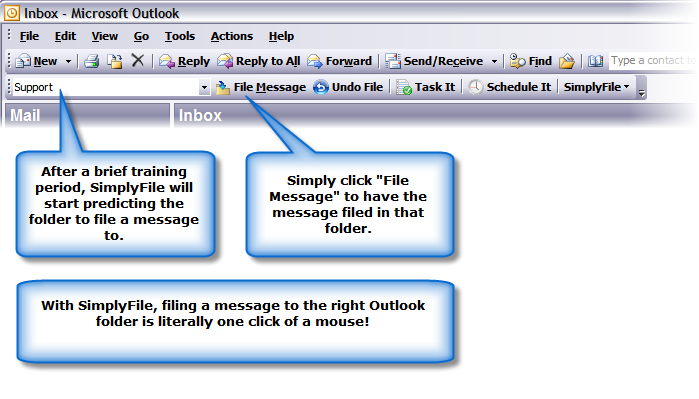
Two other buttons on the SimplyFile toolbar, "Task It" and "Schedule It," make short work of following up on an e-mail by assigning it to your to-do list or adding it to your calendar. So if you receive an e-mail regarding a matter that needs follow-up in a week, click Task It to open a new task and the e-mail will be inserted into it. Rather than save e-mails in your inbox as reminders, add them to your task list or calendar and you'll actually remember them.
SimplyFile also manages the e-mail you send. Click the "send" button, and a dialogue box appears suggesting a folder in which to file the sent message. That keeps your messages sent to someone or about something in the same folders as the messages you've received. You can also choose to save it in your sent items folder or not to save it at all. If you'd rather not have SimplyFile ask about your sent messages, you can turn off this option.
The other two add-ons I mentioned, EZDetach and MessageSave, are additional tools for managing e-mail. EZDetach, as its name suggests, is a utility for saving and categorizing e-mail attachments. The two main reasons for using this are to better manage attachments and to reduce the size of your Outlook .pst file. With just a mouse-click or two, you can remove attachments from a single message or from all messages in a folder and file them elsewhere on your computer. You can create rules wizards for filing and naming attachments or set preferences each time. Naming options allow you, for example, to append the date you received the message and the sender's name. You can even reattach a file later if, for example, you want to forward the e-mail with the original attachment.
MessageSave is a simple utility that makes it easy to back-up, save and file e-mail messages, tasks and contacts outside of Outlook. This could be useful for saving messages in the same folders as other client documents, for storing messages for legal compliance, or for keeping an audit trail. It also helps manages the size of your .pst file. As with EZDetach, you can customize the rules for saving files in a number of ways. Files can be saved as text or in .msg, .eml, mbox and vCard formats.
The price for these add-ons is $39.95 per user for SimplyFile, $39.97 per user for EZDetach, and $49.95 per user for MessageSave. You can buy a bundle of all three for $99.95 per user. Each allows you to download a 30-day free trial. They work with Outlook versions beginning with 2000, but not with Outlook Express. If you are looking for a leaner, better-organized Outlook, start with SimplyFile. The other add-ons work well, but their usefulness to you will depend on your own filing and archiving routines.
Full post as published by Lawsites on May 30, 2008 (boomark / email).
Ortho Evra Patch Risk
Ortho Evra Side Effects
Have you or a loved one suffered from Ortho Evra side effects?
Ortho Evra Side Effects
Ford Recalls
alleging cruise control switches are defective.
Polaris All-Terrain Vehicles
Defective Electronic Control Modules
Mongoose Youth ATVs
Recalled By KYMCO Due to Loss of Speed Control
Mazda Motor Corp.
alleging defective speed control switches can lead to fires.
Nintendo Control
Video game giant to pay $21 million settlement in patent lawsuit.

#1 Online Legal Resource

On 08-25 at 15:46PM
Acute perpendicular parking #NYPD #NYFD
On 08-18 at 22:18PM
Parallel parking gone bad. Too much gas UES NYC
On 08-18 at 21:41PM
UES NYC
On 08-18 at 21:25PM
Twitter suspends journalist critical of broadcast partner's coverage on dubious grounds @guyadams #nbcfail #twitterfail
On 07-30 at 17:57PM
Model example of 1st Amendment suppression by the People of New York City's Michael Bloomberg #OWS #NYPD
On 07-12 at 21:07PM
AG Holder lackadaisical on Operation in our Sites domain name seizures & RIAA lobbied free speech suppression @dajaz1
On 06-08 at 22:44PM
Why is the Catholic Church going to court over Obama contraception policy? @NewYorker commentary
On 05-31 at 10:08AM
Monks sue Louisiana for right to sell caskets made from forrest destroyed by Katrina
On 05-31 at 07:47AM
Are the abortion ultrasound laws headed for the Supreme Court?
On 05-15 at 21:52PM





11 Exercises for Your Email Inbox
Get It Done AND Clear Your Inbox - Gmail + Milk
Inbox Activity Anxiety Syndrome: Receiving 1 of 120 messages
How to stop your inbox exploding





 |
|
Contact Us | About Us | Celebrity Law Blog |
Our Partners | Disclaimer
| Law Blog Directory
| Law Jobs
| Law Tweets
| Oil Spill Video
All original material © 1999-2011 by USLaw.com. All other material, including Blog Directory feed content, are © by their respective copyright holders. |