
Home -> Law Blog Directory -> Miscellaneous Blogs -> Lawsites
(866) 635-2689 for Personal Injury or (866) 635-9402 for Criminal Defense
Find a Local Lawyer
Divorce (866) 635-6190
Personal Injury (866) 635-2689
Criminal Defense (866) 635-9402

Miscellaneous
: LawsitesClio Announces Google Apps Integration
By Robert Ambrogi

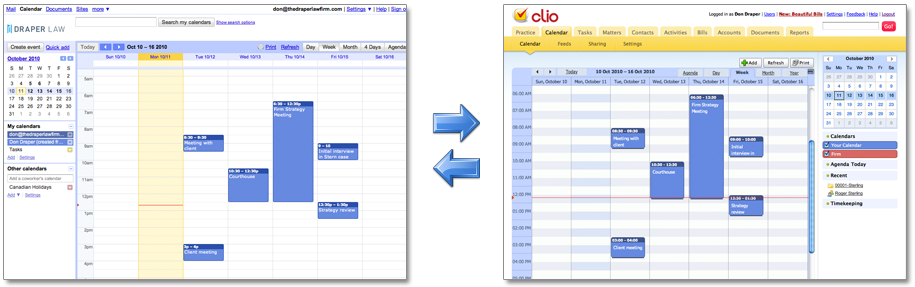
In a post two weeks ago about Clio, the cloud-based law practice management application, I said the company had a major enhancement in the works. Well, here it is. Today, Clio and Google announced Clio’s integration with Google Apps, Google’s cloud-based suite of office tools for businesses that includes Gmail, Google Calendar and Google Docs. Also, beginning today, Clio will also be added to the Google Apps Marketplace, a collection of third-party apps that integrate with Google Apps.
For Clio customers who use Google Apps, the integration offers three benefits:
- Your Clio calendar and contacts will now synchronize with your Google calendar and contacts. The sync is bi-directional, so it keeps both sets of calendars and contacts synchronized.
- Clio’s e-mail integration feature fully integrates with Gmail.
- The same sign-on you use to access Google Apps will also allow you to access Clio. When you sign-in to Google Apps, Clio will show up in your Apps navigation bar.
A side benefit of the integration is that it offers an extra-degree of redundancy to your calendar and contact information, insofar as the data will now be synchronized on both Google Apps and Clio.
Jack Newton, Clio’s president, gave me a Web demonstration of the integration in advance of today’s announcement. The connection between Google and Clio is made using the OAuth protocol, which allows access without sharing passwords or other private information. That means you don’t have to worry about someone at Google getting access to your practice-management data in Clio. To make the connection, just click the button within Clio labeled “Connect with Google.” Google then asks you to verify that you want to allow the connection between Clio and your Google account. Once you confirm, you’re done. If you have multiple calendars in Google, you can select which ones to sync.
If you are not familiar with Google Apps, you should give it a look. It is Google’s enterprise-level version of its free Gmail and Calendar apps, similar in operation to Microsoft Exchange. It costs $50 per user per year and is equally well suited to a small office or a large organization.
Clio is owned by Themis Solutions, a company based in Vancouver, B.C.
Read more about this at the Clio blog and the Google Enterprise Blog.
Full post as published by Lawsites on October 12, 2010 (boomark / email).
ASMP and Other Visual Artists File Class Action Lawsuit Against Google
Google Faces Class Action for Copyright Infringement
Exotic Meats USA
Announces Urgent Statewide Recall of Elk Tenderloin
Energy Price Gouging
Inergy Propane announces refunds to customers as part of lawsuit settlement.
Google Sued for Violating the Privacy Rights of Millions of Americans
Google Sued for Violating the Privacy Rights of Millions of Americans
Google Settles Buzz Class Action for $8.5 Million
Google Settles Buzz Class Action for $8.5 Million
Google Inc.
alleging deceptive charges for ads displayed on third party web sites.

#1 Online Legal Resource

On 08-25 at 15:46PM
Acute perpendicular parking #NYPD #NYFD
On 08-18 at 22:18PM
Parallel parking gone bad. Too much gas UES NYC
On 08-18 at 21:41PM
UES NYC
On 08-18 at 21:25PM
Twitter suspends journalist critical of broadcast partner's coverage on dubious grounds @guyadams #nbcfail #twitterfail
On 07-30 at 17:57PM
Model example of 1st Amendment suppression by the People of New York City's Michael Bloomberg #OWS #NYPD
On 07-12 at 21:07PM
AG Holder lackadaisical on Operation in our Sites domain name seizures & RIAA lobbied free speech suppression @dajaz1
On 06-08 at 22:44PM
Why is the Catholic Church going to court over Obama contraception policy? @NewYorker commentary
On 05-31 at 10:08AM
Monks sue Louisiana for right to sell caskets made from forrest destroyed by Katrina
On 05-31 at 07:47AM
Are the abortion ultrasound laws headed for the Supreme Court?
On 05-15 at 21:52PM





Blawg of the Day -- Official Clio Blog
Clio Review Clio Law Firm Software Online
Introducing Google Apps for Government





 |
|
Contact Us | About Us | Celebrity Law Blog |
Our Partners | Disclaimer
| Law Blog Directory
| Law Jobs
| Law Tweets
| Oil Spill Video
All original material © 1999-2011 by USLaw.com. All other material, including Blog Directory feed content, are © by their respective copyright holders. |